Technical SEO
Technical SEO: The Complete Guide to Improving Your Website’s Search Performance
Technical SEO is one of the most important parts of search engine optimization, yet it is often overlooked. While content and backlinks help a website attract visitors, technical SEO makes it easier for search engines to crawl, understand, and index your website.
A technically optimized website can provide a better experience for both search engines and users, helping your important pages become easier to discover in search results.
In this guide, we’ll explain what technical SEO is, why it matters, and the key technical SEO practices you should implement on your website.
What Is Technical SEO?
Technical SEO refers to the process of optimizing the technical aspects of a website so that search engines can crawl, interpret, and index its pages effectively.
Unlike content SEO, technical SEO focuses less on writing articles and more on the structure and performance of your website.
Common technical SEO activities include:
- Improving website speed
- Making a website mobile-friendly
- Creating and optimizing XML sitemaps
- Managing robots.txt
- Fixing broken links
- Implementing HTTPS
- Improving website architecture
- Fixing duplicate content issues
- Using canonical tags correctly
- Implementing structured data
- Managing redirects
- Improving Core Web Vitals

Why Is Technical SEO Important?
Search engines use automated programs called crawlers to discover and process web pages. If your website has technical problems, crawlers may have difficulty accessing or understanding important pages.
Technical SEO can help you:
- Make your website easier to crawl
- Improve page indexing
- Improve website usability
- Reduce technical errors
- Improve page-loading performance
- Provide a better mobile experience
- Help search engines understand your content
- Prevent duplicate or unwanted pages from being indexed
Technical SEO does not guarantee higher rankings by itself. However, resolving technical problems can remove barriers that prevent search engines and users from accessing your content effectively.
1. Improve Website Speed
Page speed is an important part of website performance and user experience.
Slow websites can frustrate visitors, particularly on mobile devices. Large images, unnecessary JavaScript, excessive CSS, poor hosting performance, and third-party scripts can all contribute to slow loading times.
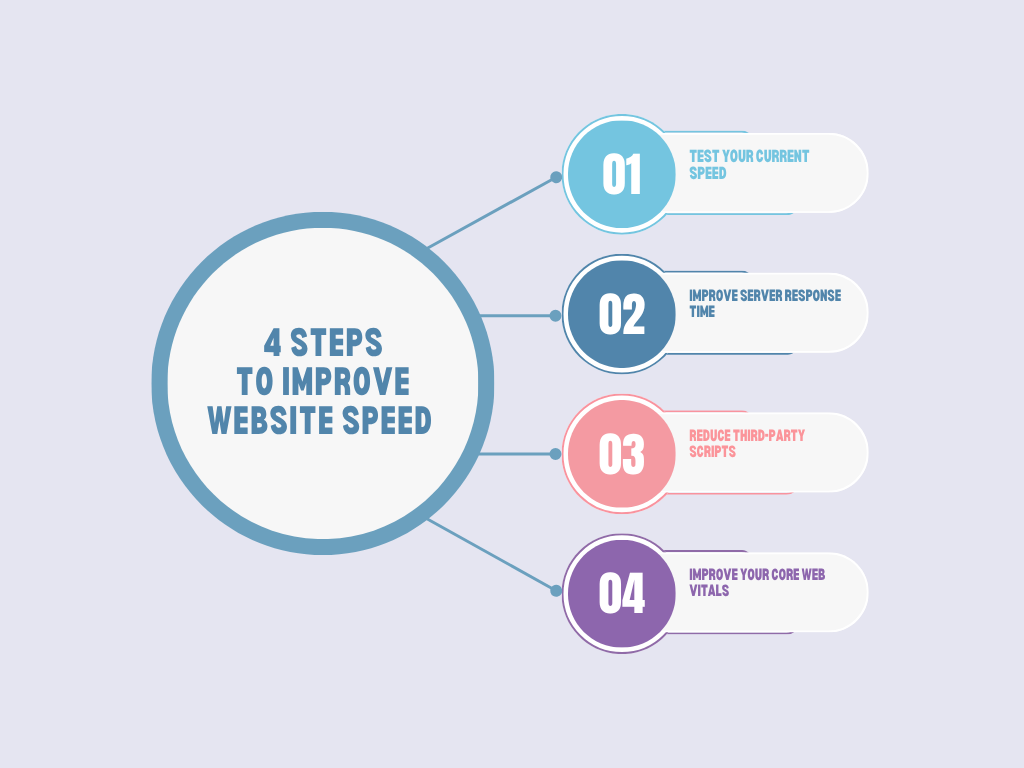
How to Improve Website Speed
Consider:
- Compressing images
- Using modern image formats such as WebP or AVIF where appropriate
- Enabling browser caching
- Minifying CSS and JavaScript
- Removing unnecessary scripts
- Using a content delivery network (CDN)
- Improving server response time
- Lazy-loading appropriate images and resources
You should also monitor Google’s Core Web Vitals, which focus on loading performance, responsiveness, and visual stability.
2. Make Your Website Mobile-Friendly
A large portion of web traffic comes from mobile devices, so your website should work properly across different screen sizes.
A mobile-friendly website should have:
- Responsive design
- Readable text
- Properly sized buttons
- Easy navigation
- Content that fits the screen
- Fast loading times
- No intrusive mobile elements that interfere with the main content
Test important pages on multiple devices and screen sizes to identify usability problems.
3. Create an XML Sitemap
An XML sitemap provides search engines with information about the URLs you consider important on your website.
A sitemap can be especially useful for:
- Large websites
- E-commerce websites
- Websites with complex structures
- New websites
- Websites with frequently updated content
Your sitemap should generally contain the canonical URLs you want search engines to discover.
After creating your sitemap, submit it through the relevant search engine webmaster tools.
4. Optimize Your Robots.txt File
The robots.txt file provides crawling instructions to search engine crawlers.
For example, you may use it to prevent crawlers from accessing certain areas of a website that do not need to be crawled.
However, robots.txt should be used carefully. Blocking a URL in robots.txt does not necessarily mean that the URL will never appear in search results.
Avoid accidentally blocking important resources or pages.
5. Use HTTPS
HTTPS encrypts the connection between a website and its visitors.
Your website should use HTTPS consistently rather than serving important pages through insecure HTTP URLs.
After moving to HTTPS, check that:
- HTTP URLs redirect appropriately to HTTPS
- Internal links use HTTPS
- Canonical tags use HTTPS
- XML sitemaps use HTTPS URLs
- Images and scripts load securely
- There are no unnecessary mixed-content issues
6. Fix Broken Links
Broken links can create poor user experiences and make website maintenance more difficult.
Common examples include links that lead to:
- Deleted pages
- Incorrect URLs
- Moved pages
- Non-existent resources
Regularly crawl your website and identify broken internal links.
When appropriate, update the link to the correct URL. If a page has permanently moved, a suitable 301 redirect may be appropriate.
7. Manage Redirects Correctly
Redirects tell browsers and crawlers that a URL has moved or should be accessed through another URL.
A 301 redirect is commonly used when a page has permanently moved.
Avoid creating unnecessary redirect chains such as:
Page A → Page B → Page C → Page D
Where possible, redirect the original URL directly to the final destination.
Regularly audit redirects, particularly after website migrations, URL structure changes, or redesigns.
8. Use Canonical Tags
Duplicate or very similar URLs can create confusion about which version of a page should be treated as the primary version.
A canonical tag can indicate the preferred URL for a page.
For example:
<link rel="canonical" href="https://example.com/services/seo/" />
Canonicalization is particularly useful for websites with:
- URL parameters
- Product variations
- Similar content
- Multiple URL versions
- Tracking parameters
Canonical tags should point to valid, indexable URLs that represent the preferred version of the content.
9. Improve Website Architecture
A clear website structure helps users and search engines navigate your site.
A simple structure might look like:
Homepage
│
├── Services
│   ├── SEO
│   ├── Web Design
│   └── Digital Marketing
│
├── Blog
│   ├── SEO Guides
│   ├── Marketing Tips
│   └── Industry News
│
└── Contact
Important pages should be accessible through internal links.
Avoid creating unnecessarily deep website structures where important pages require many clicks to reach.
10. Optimize Internal Linking
Internal links connect pages within your own website.
Good internal linking can help:
- Users discover related content
- Search engines discover pages
- Establish relationships between topics
- Distribute internal link value throughout your site
Use descriptive anchor text that naturally explains the destination page.
For example, instead of:
Click here
you could use:
Learn more about technical SEO audits
when that accurately describes the linked page.
11. Implement Structured Data
Structured data provides search engines with additional information about the content of a page.
Depending on your content, you may use structured data for things such as:
- Articles
- Products
- Organizations
- Local businesses
- Events
- Breadcrumbs
- FAQs where applicable
Structured data should accurately represent the visible content and follow the relevant search engine guidelines.
It can help search engines understand your content and, when eligible, may make pages suitable for certain enhanced search result features.
12. Fix Duplicate Content
Duplicate content occurs when substantially similar content is available at multiple URLs.
For example:
example.com/page
example.com/page/
example.com/page?source=email
Depending on how your website is configured, these URLs may represent the same content.
Possible solutions include:
- Canonical tags
- Redirects
- Consistent internal linking
- URL parameter management
- Removing unnecessary duplicate pages
The right solution depends on why the duplicate URLs exist.
13. Check Your Indexation
Not every page on a website needs to appear in search results.
Review which pages are indexed and determine whether important pages are missing.
Common indexation problems include:
- Pages accidentally marked
noindex - Incorrect canonical tags
- Pages blocked from crawling
- Redirected URLs
- Server errors
- Orphan pages
- Poor internal linking
Compare your important website URLs against the URLs that search engines can actually discover and index.
14. Monitor Core Web Vitals
Core Web Vitals are performance metrics designed to measure important aspects of user experience.
They include:
- Largest Contentful Paint (LCP): Measures loading performance.
- Interaction to Next Paint (INP): Measures responsiveness to user interactions.
- Cumulative Layout Shift (CLS): Measures visual stability.
Improving these metrics can contribute to a better overall user experience.
Focus on the underlying causes rather than trying to optimize a score in isolation.
15. Create a Technical SEO Audit
A technical SEO audit helps identify problems that may affect crawling, indexing, performance, and usability.
A basic audit should check:
Crawling
- Is robots.txt configured correctly?
- Can search engines access important pages?
- Are there unnecessary crawl barriers?
Indexing
- Are important pages indexed?
- Are unwanted pages indexed?
- Are canonical tags correct?
- Are important pages accidentally marked
noindex?
Website Performance
- Are pages loading quickly?
- Are Core Web Vitals performing well?
- Are images optimized?
- Is unnecessary JavaScript slowing down the site?
URLs
- Are URLs clean and consistent?
- Are there duplicate URL versions?
- Are redirects working correctly?
- Are broken URLs present?
Mobile
- Does the website work correctly on mobile?
- Is content accessible on smaller screens?
- Are buttons and navigation elements easy to use?
Security
- Is HTTPS implemented correctly?
- Are there mixed-content issues?
- Are security certificates valid?
Technical SEO Checklist
Use this checklist when auditing a website:
- Website uses HTTPS
- Website is mobile-friendly
- XML sitemap is available
- XML sitemap contains appropriate URLs
- Robots.txt is correctly configured
- Important pages can be crawled
- Important pages can be indexed
- Canonical tags are correctly implemented
- Broken links have been identified
- Redirect chains have been minimized
- 404 errors are monitored
- Internal linking is logical
- Website architecture is clear
- Images are optimized
- Page speed is monitored
- Core Web Vitals are monitored
- Structured data is implemented where appropriate
- Duplicate URLs are managed
- Orphan pages are identified
- Important pages are included in the site’s navigation or internal linking structure
Final Thoughts
Technical SEO provides the foundation for a healthy website. Before investing heavily in content marketing or link building, make sure search engines can efficiently crawl and understand your website.
Start with the fundamentals: HTTPS, crawling, indexing, mobile usability, website speed, redirects, canonicalization, internal linking, and structured data.
Technical SEO is not a one-time task. Websites change constantly, so regular technical audits can help you identify new problems before they affect users or search visibility.
A technically sound website gives your content a stronger foundation and makes it easier for search engines to discover and p